
Mass Unfollow on Twitter (X)
UnfollowX Pro lets you mass unfollow on Twitter (X) for free. Scan the accounts you follow, filter non-followers and inactive profiles, protect the people who matter, then bulk unfollow at a safe, human pace — without sharing your password.
4.9/5 on the Chrome Web Store · 54 ratings- Free forever — no subscription, no premium tier
- Random delays, breaks and a daily limit on every run
- Whitelisted accounts are never unfollowed, in any mode
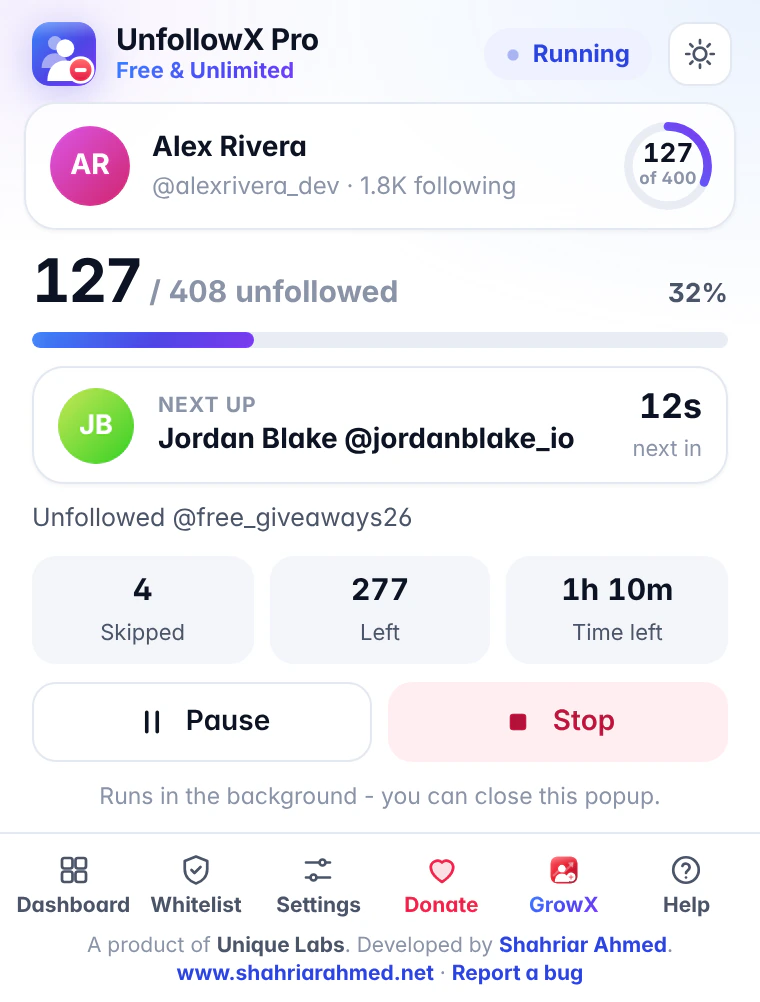
A Twitter mass unfollow tool that shows you everything first
X’s own website only lets you unfollow one account at a time. That’s fine for a handful of profiles, but cleaning up hundreds of follows by hand means opening profiles, checking whether they follow you back and clicking Unfollow again and again.
UnfollowX Pro is a free Chrome extension that does the reading for you. One read-only scan goes through your whole following list and marks every account as a mutual or a non-follower. You then filter the list, protect anyone you want to keep and start a bulk unfollow run that works through your selection on its own — while you do something else.
Nothing changes on your account until you choose an action, and every run uses pacing controls you can see and adjust. If you only want to know who doesn’t follow you back, start with the free non-followers checker.
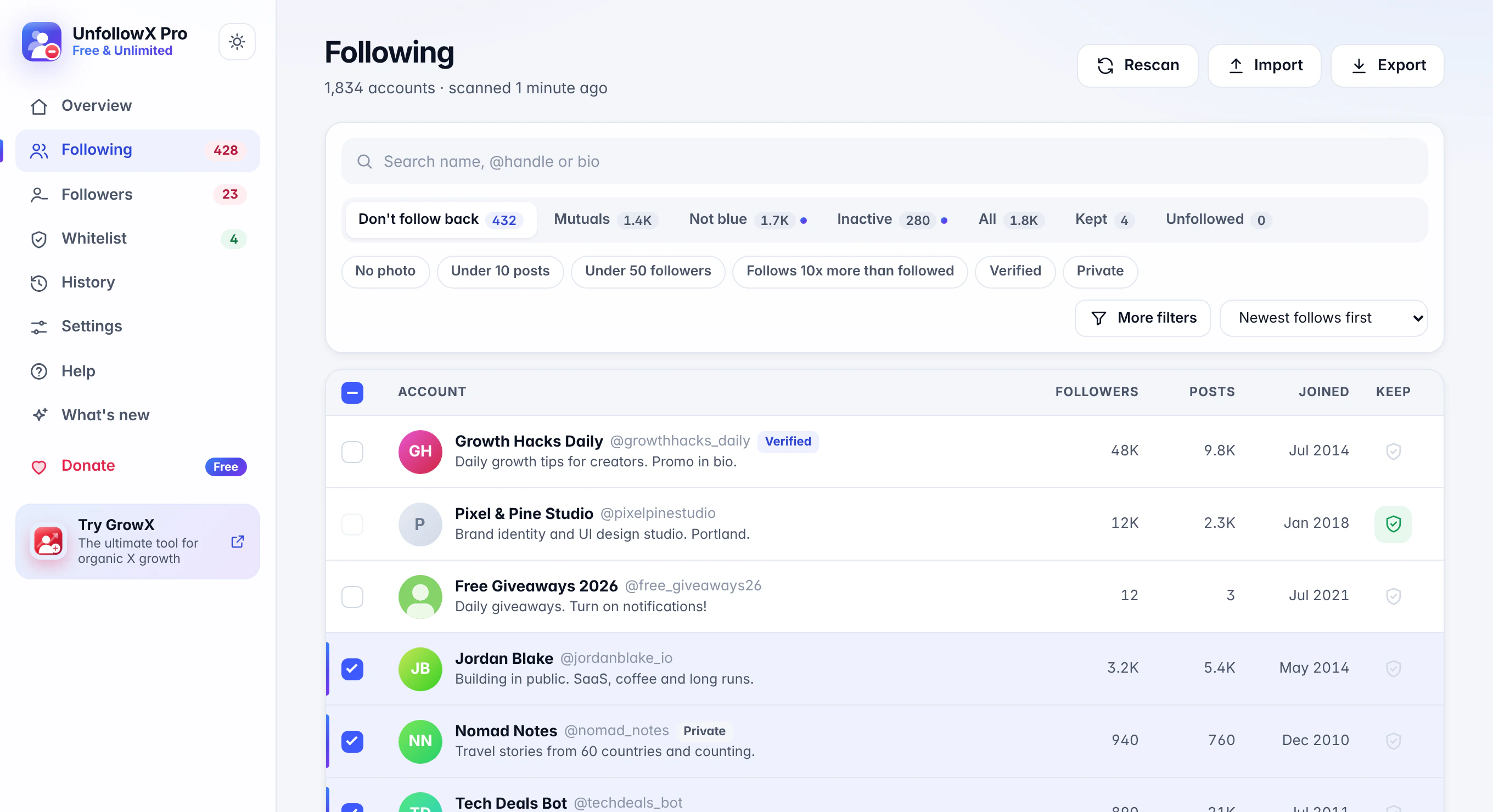
How to mass unfollow on Twitter (X) in 3 steps
Most lists take about a minute to scan. The unfollow run itself is deliberately slower — that’s the point.
- Install UnfollowX Pro and open XAdd the free extension from the Chrome Web Store, then open x.com (or twitter.com) in Chrome while signed in to the account you want to clean up. No password is shared and there is no sign-up.
- Scan and filter who to unfollowClick the extension icon and press “Scan my following”. The scan only reads. Open Review & pick to filter the list — non-followers, inactive accounts, no profile photo, not blue, few posts — and protect anyone with the whitelist shield.
- Start a paced bulk unfollow runPress “Unfollow N non-followers” or unfollow your selection. The run works in the background with random delays, breaks and your daily limit, skips whitelisted accounts, and can be paused or stopped at any time.
Prefer a full walkthrough with every button and setting? Read the step-by-step UnfollowX Pro setup guide.
Choose exactly who to bulk unfollow
Most people don’t want to unfollow every non-follower — news sites, experts and creators rarely follow back. Filters turn a long list into a short, deliberate one.
Non-followers
The Don’t follow back tab lists every account that doesn’t follow you, using X’s own “follows you” flag. Mutuals sit in their own tab.
Inactive: 30, 90, 180 days or 1 year
Filter by the newest post, reply or repost the extension can read. Accounts whose date can’t be read are listed as Unavailable — never guessed.
No profile photo
One quick filter finds accounts still using the default avatar — often abandoned or throwaway profiles.
Not blue (unverified)
The Not blue tab shows accounts without X Premium’s blue check. Legacy and organisation checks are tagged, not hidden.
Few posts
Under 10 posts, under 50 followers, or following 10× more accounts than follow them — quick filters for low-activity accounts.
And more
Followers range, follow ratio, join date, bio contains / doesn’t contain, writing system, search by name or handle, and saved groups.
Built-in pacing on every bulk unfollow
- Random gaps between actions, so a run never fires at a fixed rhythm.
- Breaks after a set number of actions.
- A daily limit per rolling 24 hours — 400 by default — that continues automatically once there’s room.
- Rests when X asks the extension to slow down, and stops when X asks you to verify your account.
- Emergency stop with Alt + Shift + S.
| Preset | Between actions | Break | Daily limit |
|---|---|---|---|
| Safe | 15–35 s | 10 min every 30 | 250 |
| Balanced (default) | 8–20 s | 6 min every 50 | 400 |
| Fast | 4–10 s | 5 min every 80 | 1,000 |
Honest note: X applies its own limits and rules to every account, whatever tool you use, and no tool can guarantee X will never limit an account. Start with Safe or Balanced, avoid unfollowing thousands of accounts in one go, and stop if X shows a warning. More in how X limits work.
Manual unfollowing vs UnfollowX Pro
Unfollowing by hand is free and fine for a few accounts. Past a few dozen, a mass unfollow tool saves real time.
| Task | By hand on X | With UnfollowX Pro |
|---|---|---|
| Seeing who follows back | Open each profile and look for “Follows you” | Every account marked after one read-only scan |
| Finding inactive accounts | Open each profile and check the last post | 30 / 90 / 180 / 365-day filters |
| Unfollowing 300 accounts | 300 separate clicks (and confirmations) | Select a group, press start once |
| Protecting important accounts | You have to remember them | Whitelist and Keep rules, checked before every unfollow |
| Pace | However fast you click | Random delays, breaks and a daily limit |
| Record of what changed | None | History with dates, CSV export and Follow again |
| Works on phone | Yes | No — desktop Chrome 116+ only |
| Cost | Free | Free — no subscription or premium tier |
Comparing tools? See the best mass unfollow tools for Twitter (X) or our free Circleboom alternative page.
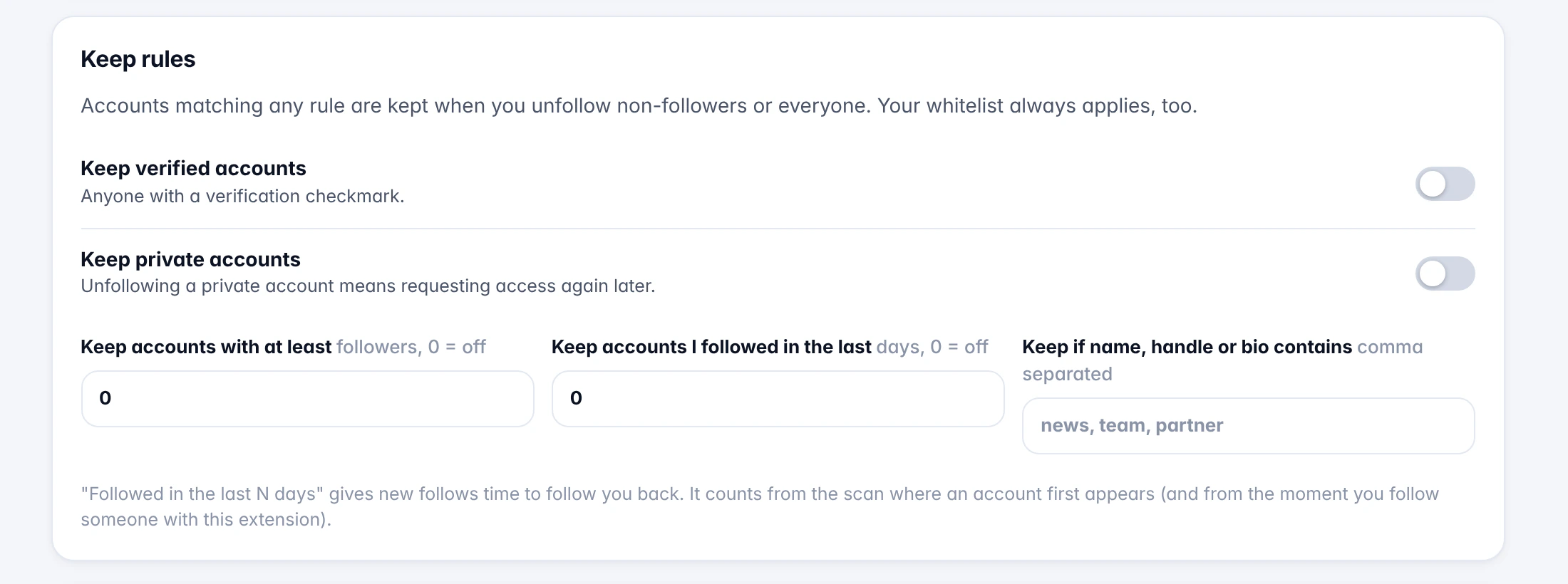
Whitelist and Keep rules
Tap the shield on any account to add it to your whitelist. Whitelisted accounts can’t be selected and are never unfollowed — in any mode, including “Unfollow all”. You can paste several handles or profile links at once.
Keep rules protect whole groups: verified accounts, private accounts, accounts above a follower threshold, anyone whose name, handle or bio matches a keyword, and accounts you followed in the last N days. Both are checked again before every single unfollow, even in the middle of a run. Guide: how to whitelist accounts before unfollowing.
No password. Your lists stay on your computer.
UnfollowX Pro works inside the X session you already use in Chrome, so it never asks for your password and never signs in for you. Scans, follower snapshots, your whitelist, settings and history are kept in Chrome extension storage on your device, not uploaded to the developer. Anonymous usage statistics can be switched off in Settings, and one button deletes all extension data. Full details are in the privacy policy.
Mass unfollow on Twitter: FAQ
Is UnfollowX Pro free?
Yes. Every feature, including bulk unfollow, filters, whitelist, Keep rules, history and CSV, is free. There is no trial, no subscription, no premium tier and no payment details to enter.
Is mass unfollowing allowed on Twitter / X?
Unfollowing accounts is a normal part of using X, and tidying your following list is allowed. X’s rules do target aggressive, bulk or indiscriminate following and unfollowing and “follow churn” (following and unfollowing to gain followers), and X decides what counts as aggressive. Read X’s automation rules and run cleanups at a measured pace.
Is it safe to mass unfollow on X?
UnfollowX Pro is built to keep you measured: random gaps between actions, regular breaks, a rolling daily limit, a rest when X asks it to slow down and a full stop when X asks you to verify your account. No tool can guarantee X will never limit an account, so start with the Safe or Balanced preset and stop if X shows a warning.
How many accounts can I unfollow per day?
UnfollowX Pro sets no cap of its own. The daily limit in Settings is a pacing control you own: Safe 250, Balanced 400, Fast 1,000 per rolling 24 hours (Balanced, 400, is the default), adjustable or switchable off. When the limit is reached the run waits and continues automatically. X doesn’t publish a fixed daily unfollow number; its help center describes a technical limit of 400 follows per day and says limits can change.
Does it need my Twitter / X password?
No. The extension works inside the X session you are already signed in to in Chrome. It never asks for, stores or sends your password, and it has no account system of its own.
Does it work on twitter.com and x.com?
Yes. UnfollowX Pro works on both x.com and twitter.com, on X’s new web layout and the classic one. It runs in desktop Chrome 116 or newer; Chrome on phones doesn’t support extensions.
Can I undo a mass unfollow?
You can re-follow. History keeps every account the extension unfollowed, with dates; select the ones you want back and press Follow again. Re-following restores the follow itself, not anything else about the old connection, and private accounts receive a new follow request.
Can I pause or stop a run halfway?
Yes. Pause, resume or stop from the popup or dashboard, or press Alt + Shift + S for an emergency stop. Runs continue in the background if you switch tabs or close the popup.
Learn more before a big cleanup
How to Mass Unfollow on Twitter (X) Without Losing the Accounts You Value
A review-first guide to mass unfollow on Twitter (X): pick the right group, protect important accounts, set a sensible pace and stay within X’s limits.
Read articleHow to Unfollow Someone on Twitter (X) – Web, iPhone & Android
How to unfollow someone on Twitter (X) on the web, iPhone and Android, how to see who you follow, what they see, and how to unfollow hundreds at once.
Read articleHow to Whitelist Accounts Before Unfollowing on X
Protect friends, clients and must-follow accounts before any bulk cleanup on X, using a whitelist and Keep rules — and check that protection actually applied.
Read articleAlso useful: unfollow everyone at once, find inactive accounts and see who unfollowed you.
Bulk unfollow on Twitter (X), at your pace.
Free forever. Read-only scan first, whitelist always respected, no password required.
No sign-up · No X password · No premium plan